

[ETF] Entity Texture Features
Mod · by Traben · 113.2M downloads · Minecraft 26.3
What does Entity Texture Features do?
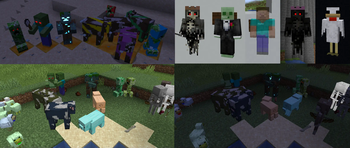
Many popular resource packs give mobs extra variety – villagers with different faces, cows in several colours, glowing spider eyes, creepers whose texture changes by biome. Those packs were built for OptiFine. Entity Texture Features (ETF) teaches Fabric, Quilt, NeoForge and Forge to read the same files, so you can use those packs without OptiFine.
It does not ship any textures itself. You need a resource pack that uses these features to see a difference.
Main features
- Random and custom entity textures in the OptiFine format, with extra properties beyond what OptiFine offers for choosing which texture a mob gets.
- Emissive textures – parts of a mob that glow in the dark, like eyes or magma.
- Blinking mobs through a simple texture format.
- Player skin extras – skins can blink, have glowing parts and more, visible to other ETF users.
- Modded mobs are supported as long as their mod draws them with vanilla rendering code.
Requirements and compatibility
- Loaders – Fabric, Quilt, NeoForge, Forge.
- Minecraft – 1.16.5 through 26.3.
- Side – client only; servers do not need it.
- Works with – Sodium, Iris (emissives vary by shader) and Entity Model Features.
Settings are available from Mod Menu, from a button on the resource pack screen, or in config/entity_texture_features.json.
Beyond those three, ETF also plays nicely with OptiFine-format random, custom and emissive entity packs in general and with dorianpb's older CEM mod. The author's GitHub hosts separate guides for random textures, emissive textures, blinking and player skin features, which are worth reading if you make packs rather than just use them.
For mod developers
Any mod that adds entities works with ETF as long as it renders them the vanilla way. If your mod shows a mob inside a custom GUI and you want it to keep its default texture, ETF skips variants when the entity's block state is null or VOID_AIR, or when the display mob's UUID is generated from the bytes of the string "GENERIC" via UUID.nameUUIDFromBytes.
Help and licence
The author prefers questions on his Discord server; bugs can also be filed as GitHub issues. ETF is open source under LGPL-3.0.
Who is it for?
Anyone who moved from OptiFine to Sodium and misses their texture packs. The classic combination is ETF + EMF + Fresh Animations for lively animated mobs. Want more OptiFine features on modern loaders? LambdaAurora keeps a well-known list of OptiFine alternatives, or you can grab Fabulously Optimized, which bundles every OptiFine parity mod, ETF included.
FAQ
Is ETF a replacement for OptiFine?
For entity textures, yes. It reads the OptiFine random, custom and emissive texture formats, so packs made for OptiFine work. Other OptiFine features need different mods.
Do I need Entity Model Features too?
ETF handles textures, EMF handles custom models. Packs like Fresh Animations change mob models, so they need both. Texture-only packs work with ETF alone.
Does ETF work with Sodium and Iris?
Yes, both are listed as compatible. With Iris, how well emissive textures look depends on the shader pack you use.
Gallery


Downloads by version
| Minecraft | Loader | Mod version | File | |
|---|---|---|---|---|
| 26.3 | Fabric | 7.2.7-fabric-26.3 | 0.8 MB | Download |
| 26.3 | NeoForge | 7.2.7-neoforge-26.3 | 0.8 MB | Download |
| 26.3 | Quilt | 7.2.7-fabric-26.3 | 0.8 MB | Download |
| 26.2 | Fabric | 7.2.7-fabric-26.2 | 0.8 MB | Download |
| 26.2 | NeoForge | 7.2.7-neoforge-26.2 | 0.8 MB | Download |
| 26.2 | Quilt | 7.2.7-fabric-26.2 | 0.8 MB | Download |
| 26.1.2 | Fabric | 7.2.7-fabric-26.1 | 0.8 MB | Download |
| 26.1.2 | NeoForge | 7.2.7-neoforge-26.1 | 0.8 MB | Download |
| 26.1.2 | Quilt | 7.2.7-fabric-26.1 | 0.8 MB | Download |
| 26.1.1 | Fabric | 7.2.7-fabric-26.1 | 0.8 MB | Download |
| 26.1.1 | NeoForge | 7.2.7-neoforge-26.1 | 0.8 MB | Download |
| 26.1.1 | Quilt | 7.2.7-fabric-26.1 | 0.8 MB | Download |
| 26.1 | Fabric | 7.2.7-fabric-26.1 | 0.8 MB | Download |
| 26.1 | NeoForge | 7.2.7-neoforge-26.1 | 0.8 MB | Download |
| 26.1 | Quilt | 7.2.7-fabric-26.1 | 0.8 MB | Download |
| 1.21.11 | Fabric | 7.2.7-fabric-1.21.11 | 0.8 MB | Download |
| 1.21.11 | Forge | 7.2.7-forge-1.21.11 | 0.9 MB | Download |
| 1.21.11 | NeoForge | 7.2.7-neoforge-1.21.11 | 0.8 MB | Download |
| 1.21.11 | Quilt | 7.2.7-fabric-1.21.11 | 0.8 MB | Download |
| 1.21.10 | Fabric | 7.2.7-fabric-1.21.9 | 0.8 MB | Download |
| 1.21.10 | Forge | 7.2.7-forge-1.21.9 | 0.9 MB | Download |
| 1.21.10 | NeoForge | 7.2.7-neoforge-1.21.9 | 0.8 MB | Download |
| 1.21.10 | Quilt | 7.2.7-fabric-1.21.9 | 0.8 MB | Download |
| 1.21.9 | Fabric | 7.2.7-fabric-1.21.9 | 0.8 MB | Download |
| 1.21.9 | Forge | 7.2.7-forge-1.21.9 | 0.9 MB | Download |
| 1.21.9 | NeoForge | 7.2.7-neoforge-1.21.9 | 0.8 MB | Download |
| 1.21.9 | Quilt | 7.2.7-fabric-1.21.9 | 0.8 MB | Download |
| 1.21.8 | Fabric | 7.2.7-fabric-1.21.6 | 0.8 MB | Download |
| 1.21.8 | Forge | 7.2.7-forge-1.21.6 | 0.9 MB | Download |
| 1.21.8 | NeoForge | 7.2.7-neoforge-1.21.6 | 0.8 MB | Download |
| 1.21.8 | Quilt | 7.2.7-fabric-1.21.6 | 0.8 MB | Download |
| 1.21.7 | Fabric | 7.2.7-fabric-1.21.6 | 0.8 MB | Download |
| 1.21.7 | Forge | 7.2.7-forge-1.21.6 | 0.9 MB | Download |
| 1.21.7 | NeoForge | 7.2.7-neoforge-1.21.6 | 0.8 MB | Download |
| 1.21.7 | Quilt | 7.2.7-fabric-1.21.6 | 0.8 MB | Download |
| 1.21.6 | Fabric | 7.2.7-fabric-1.21.6 | 0.8 MB | Download |
| 1.21.6 | Forge | 7.2.7-forge-1.21.6 | 0.9 MB | Download |
| 1.21.6 | NeoForge | 7.2.7-neoforge-1.21.6 | 0.8 MB | Download |
| 1.21.6 | Quilt | 7.2.7-fabric-1.21.6 | 0.8 MB | Download |
| 1.21.5 | Fabric | 7.2.7-fabric-1.21.5 | 0.8 MB | Download |
How to install this mod
- Install Fabric for the Minecraft version you play.
- Pick your Minecraft version + loader in the table above and click “Download” to get the .jar.
- Open
.minecraft/mods(Windows: type%appdata%\.minecraftin the address bar) and copy the file there. - Start the launcher, choose the Fabric profile and press Play.
💬 Comments
✨ You might also like

[EMF] Entity Model Features
by Traben
EMF is an, OptiFine format, Custom Entity Model replacement mod available for Fabric and Forge.
Continuity
by Pepper_Bell
A Minecraft mod that allows for efficient connected textures

LambDynamicLights - Dynamic Lights
by LambdAurora
Adds dynamic lights to Minecraft as the most feature-complete and optimized dynamic lighting mod.

BetterF3
by TreyRuffy
BetterF3 is a mod that replaces Minecraft's original debug HUD with a highly customizable, more human-readable HUD.

Supplementaries
by MehVahdJukaar
Vanilla+ additions: Jars, signposts, faucets, weather vanes spring launchers, sconces, planters, lights, decoration and automation

Create
by simibubi
Aesthetic Technology that empowers the Player