

Mod Menu
Mod · by Prospector · 163.8M downloads · Minecraft 26.3
A mod list for Fabric
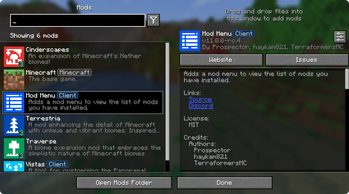
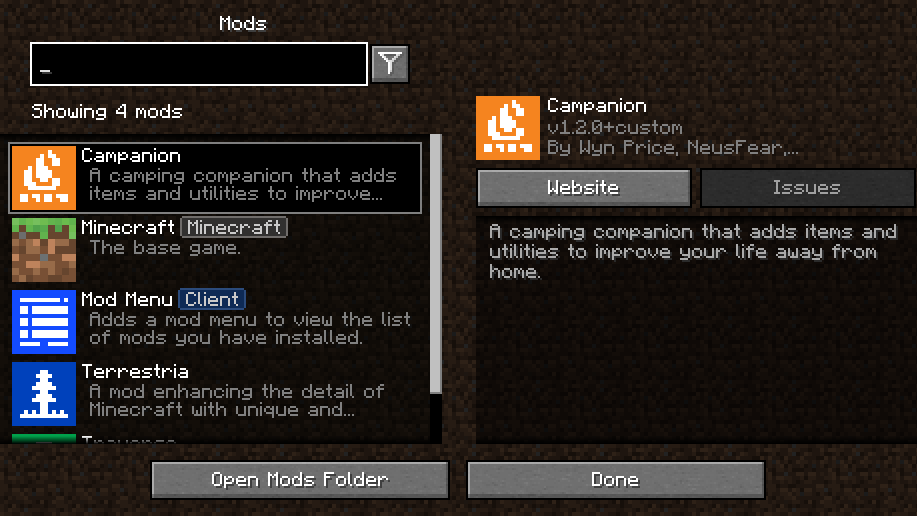
Vanilla Minecraft with Fabric has no screen that tells you which mods are loaded. Mod Menu adds one. Click the new Mods button on the title screen or the pause menu and you get a list of everything installed, with icons, descriptions, authors and links.
Its biggest everyday use is reaching settings. When a mod offers a config screen, Mod Menu shows a button that opens it directly, so you are not stuck editing files in the config folder.
What you get
- Search and filters – library mods are hidden by default so the list shows the mods you actually chose; one toggle brings them back.
- Config shortcuts for any mod that supports them.
- Update checker for mods hosted on Modrinth (and mods that provide their own update source), so outdated files are easy to spot.
- Badges that mark client-only, library or deprecated mods at a glance.
- Translated names and descriptions when a mod includes them, which helps on non-English game languages.
- Formatted descriptions – thanks to Text Placeholder API, authors can style their text with QuickText tags (colours, bold and so on).
- Grouped modules – big projects split into many parts, such as Fabric API, appear as one parent entry you can expand instead of dozens of separate lines.
- Plenty of options to tweak how the menu itself behaves.
Requirements
Mod Menu runs on Fabric or Quilt for Minecraft: Java Edition 1.14 and newer, and is a client-side mod – servers do not need it. It requires Fabric API and Text Placeholder API, which handles formatted text in descriptions. Install all three for the same Minecraft version.
For mod developers
Mod Menu also gives authors several ways to control how their mod is presented, and none of them force players to install Mod Menu:
- Translation keys – add
modmenu.nameTranslation.<modid>,modmenu.summaryTranslation.<modid>andmodmenu.descriptionTranslation.<modid>to any language file to translate the name, the one-line summary and the long description without writing Java. - Metadata in
fabric.mod.json– inside acustom→modmenublock you can add extra links (the key doubles as a translation key, with ready-made ones likemodmenu.discord; use your own namespace for custom ones), thelibraryordeprecatedbadge (the client badge is automatic for client-only mods, and custom badges are not supported), aparentthat nests your mod under another mod or under a dummy parent you describe with id, name, description, icon and badges, and"update_checker": falseto opt out of the Modrinth hash-based update check. - Quilt uses the same options, but the
modmenublock sits at the root ofquilt.mod.json. - Java API – add Mod Menu from the Terraformers Maven repository as a dev dependency (or compile-only if you only need the API), implement
ModMenuApiand register it as amodmenuentrypoint. From there you can supply your own config screen, provide config screens for other mods (the way Cloth Config does), hand out the Modpack badge, or use helpers that build the Mods screen and its button text.
Why almost every Fabric setup includes it
Once you have more than a handful of mods, Mod Menu becomes the control panel for your game. It pairs naturally with mods that expose settings through Cloth Config or YACL, and with performance mods like Sodium and Iris. If you are building a lightweight pack from scratch, our FPS mods guide is a good companion list.
FAQ
Where is the Mod Menu button?
After installing, a Mods button appears on the title screen and in the pause menu. It opens a searchable list of every mod you have loaded.
Why can't I open the settings of some mods?
Mod Menu only shows a config button when the mod itself provides a settings screen. Many mods rely on a library such as Cloth Config for that screen, so make sure it is installed too.
Does Mod Menu work on Forge or NeoForge?
No. It is made for Fabric and Quilt only. Forge and NeoForge already ship with their own mod list.
Gallery

Downloads by version
How to install this mod
- Install Fabric for the Minecraft version you play.
- Pick your Minecraft version + loader in the table above and click “Download” to get the .jar.
- Open
.minecraft/mods(Windows: type%appdata%\.minecraftin the address bar) and copy the file there. - Start the launcher, choose the Fabric profile and press Play.
💬 Comments
🔗 Works well with


✨ You might also like

FerriteCore
by malte0811
Memory usage optimizations

YetAnotherConfigLib (YACL)
by isxander
A builder-based configuration library for Minecraft!

Xaero's Minimap
by thexaero
Displays a map of the nearby world terrain, players, mobs, entities in the corner of your screen. Lets you create waypoints which help you find the locations you've marked.

[ETF] Entity Texture Features
by Traben
Emissive, Random & Custom texture support for entities in resourcepacks just like Optifine but for Fabric

Sodium Extra
by FlashyReese
A Sodium addon that adds features that shouldn't be in Sodium.

[EMF] Entity Model Features
by Traben
EMF is an, OptiFine format, Custom Entity Model replacement mod available for Fabric and Forge.