

Iris Shaders
Mod · by coderbot · 197.5M downloads · Minecraft 26.3
What Iris does
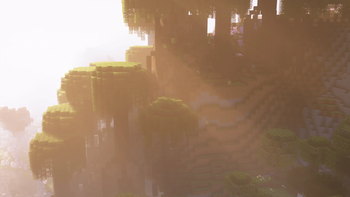
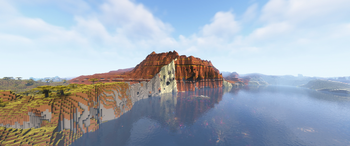
Minecraft Java has no built-in way to load shader packs. For years OptiFine was the only option, but it does not play well with modern mod loaders. Iris fills that gap: it is a shader loader for Fabric, Quilt and NeoForge that reads the same shader pack format OptiFine made popular, so the large library of existing packs keeps working.
Because Iris runs on top of Sodium, you get shaders and a much faster renderer in one setup instead of choosing between good looks and good frame rates.
How to use Iris shaders
- Install a loader (Fabric is the most common choice), then put Sodium and Iris for the same game version into your
modsfolder. - Launch the game once so the
shaderpacksfolder is created. - Drop a shader pack
.zipinto that folder – no need to unzip it. - Open Options → Video Settings → Shader Packs, pick the pack and press Apply.
A keybind lets you toggle shaders on and off in-game, which is handy when you want to compare performance. Our shader install guide covers the same steps in more detail, including what to do when a pack fails to load.
Good to know
- Not every pack works. Iris supports almost all OptiFine shader packs, but the developers document a small set of incompatible ones and a few limitations they cannot fix.
- Some features are Iris-only. Packs such as Photon enable extras like voxel colored lighting only when running on Iris.
- Client side only. Servers do not need it, and it works on vanilla and modded servers alike.
- Open source under LGPL-3.0, with support and live development news on the official Discord.
- Where to read more – the official site irisshaders.dev hosts downloads and screenshots, while the project's GitHub has the installation guide, an FAQ page, the unsupported-pack list, the limitations page, the README and developer docs for anyone who wants to build Iris or contribute. Shader packs themselves are easiest to browse in Modrinth's shaders section.
Which shader to start with
If your PC is mid-range, Complementary Reimagined is a safe first pick. On weaker hardware try MakeUp Ultra Fast or read our tips on shaders for low-end PCs. Want more video options alongside shaders? Add Sodium Extra.
FAQ
Does Iris need Sodium?
Yes. Iris is built on top of Sodium and lists it as a required dependency, so install both mods for the same Minecraft version and loader.
Can I use OptiFine shader packs with Iris?
Most of them, yes. Iris was designed to read the shader pack format OptiFine uses. The Iris team keeps a short list of packs that do not work, so check it if a pack shows errors.
Do I need to install Iris on my server?
No. Iris is client-only and does nothing on a server. Every player can decide for themselves whether to run shaders.
Gallery


Downloads by version
| Minecraft | Loader | Mod version | File | |
|---|---|---|---|---|
| 26.3 | Fabric | 1.11.7+26.3-fabric | 2.7 MB | Download |
| 26.3 | NeoForge | 1.11.7+26.3-neoforge | 2.7 MB | Download |
| 26.2 | Fabric | 1.11.4+26.2-fabric | 2.7 MB | Download |
| 26.2 | NeoForge | 1.11.4+26.2-neoforge | 2.6 MB | Download |
| 26.1.2 | Fabric | 1.11.4+26.1-fabric | 2.7 MB | Download |
| 26.1.2 | NeoForge | 1.11.4+26.1-neoforge | 2.6 MB | Download |
| 26.1.1 | Fabric | 1.11.4+26.1-fabric | 2.7 MB | Download |
| 26.1.1 | NeoForge | 1.11.4+26.1-neoforge | 2.6 MB | Download |
| 26.1 | Fabric | 1.11.4+26.1-fabric | 2.7 MB | Download |
| 26.1 | NeoForge | 1.11.4+26.1-neoforge | 2.6 MB | Download |
| 1.21.11 | Fabric | 1.10.8+1.21.11-fabric | 2.7 MB | Download |
| 1.21.11 | NeoForge | 1.10.8+1.21.11-neoforge | 2.6 MB | Download |
| 1.21.11 | Quilt | 1.10.6+1.21.11-fabric | 2.7 MB | Download |
| 1.21.10 | Fabric | 1.9.7+1.21.10-fabric | 2.6 MB | Download |
| 1.21.10 | NeoForge | 1.9.7+1.21.10-neoforge | 2.5 MB | Download |
| 1.21.10 | Quilt | 1.9.4+1.21.10-fabric | 2.6 MB | Download |
| 1.21.9 | Fabric | 1.9.7+1.21.10-fabric | 2.6 MB | Download |
| 1.21.9 | Quilt | 1.9.4+1.21.10-fabric | 2.6 MB | Download |
| 1.21.8 | Fabric | 1.9.6+1.21.8-fabric | 2.6 MB | Download |
| 1.21.8 | NeoForge | 1.9.6+1.21.8-neoforge | 2.6 MB | Download |
| 1.21.8 | Quilt | 1.9.5+1.21.8-fabric | 2.6 MB | Download |
| 1.21.7 | Fabric | 1.9.6+1.21.8-fabric | 2.6 MB | Download |
| 1.21.7 | NeoForge | 1.9.6+1.21.8-neoforge | 2.6 MB | Download |
| 1.21.7 | Quilt | 1.9.5+1.21.8-fabric | 2.6 MB | Download |
| 1.21.6 | Fabric | 1.9.6+1.21.8-fabric | 2.6 MB | Download |
| 1.21.6 | NeoForge | 1.9.6+1.21.8-neoforge | 2.6 MB | Download |
| 1.21.6 | Quilt | 1.9.5+1.21.8-fabric | 2.6 MB | Download |
| 1.21.5 | Fabric | 1.8.11+1.21.5-fabric | 2.6 MB | Download |
| 1.21.5 | NeoForge | 1.8.11+1.21.5-neoforge | 2.5 MB | Download |
| 1.21.5 | Quilt | 1.8.11+1.21.5-fabric | 2.6 MB | Download |
| 1.21.4 | Fabric | 1.8.8+1.21.4-fabric | 2.6 MB | Download |
| 1.21.4 | NeoForge | 1.8.8+1.21.4-neoforge | 2.5 MB | Download |
| 1.21.4 | Quilt | 1.8.8+1.21.4-fabric | 2.6 MB | Download |
| 1.21.3 | Fabric | 1.8.1+1.21.3-fabric | 2.5 MB | Download |
| 1.21.3 | NeoForge | 1.8.1+1.21.3-neoforge | 2.5 MB | Download |
| 1.21.3 | Quilt | 1.8.1+1.21.3-fabric | 2.5 MB | Download |
| 1.21.2 | Fabric | 1.8.0+1.21.3-fabric | 2.5 MB | Download |
| 1.21.1 | Fabric | 1.8.14-beta.1+1.21.1-fabric | 2.7 MB | Download |
| 1.21.1 | NeoForge | 1.8.14-beta.1+1.21.1-neoforge | 2.4 MB | Download |
| 1.21.1 | Quilt | 1.8.8+1.21.1-fabric | 2.6 MB | Download |
How to install this mod
- Install Fabric for the Minecraft version you play.
- Pick your Minecraft version + loader in the table above and click “Download” to get the .jar.
- Open
.minecraft/mods(Windows: type%appdata%\.minecraftin the address bar) and copy the file there. - Start the launcher, choose the Fabric profile and press Play.
💬 Comments
🔗 Works well with

✨ You might also like

Oculus
by Asek3
Unofficial Fork of "Iris", made to work with FML

Sodium Dynamic Lights
by Txni
Multiloader port of LambDynLights that adds Sodium options integration
Boat Item View
by 50ap5ud5
See your held items as you row your boat!

Better Beds
by Motschen
Changes the renderer of the bed to use json models instead of a block entity renderer!

Entity Culling
by tr7zw
Using async path-tracing to hide Block-/Entities that are not visible

FerriteCore
by malte0811
Memory usage optimizations