

Complementary Shaders - Reimagined
Shader · by EminGT · 73.9M downloads · Minecraft 26.3
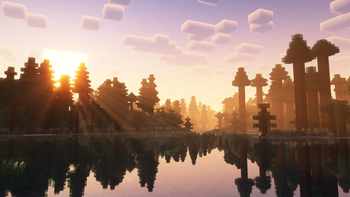
A shader that still looks like Minecraft
Many shader packs push Minecraft toward photorealism. Complementary Reimagined takes the opposite route: it keeps the pixel-art character of the game and polishes everything around it. Shadows, light, water, fog and sky get a big upgrade, while clouds, textures and colors stay recognizably vanilla. The project began as an edit of BSL in 2018 and has since been rewritten and updated continuously based on player feedback.
Highlights
- Custom touches for almost every block, so lava, ores, glass and plants each react to light in their own way.
- Quality profiles from Potato to Ultra, which makes it one of the most flexible packs for mixed hardware.
- Designed not to get in the way of gameplay, so caves are dark but readable and nights are atmospheric without being blinding.
- A deep Shader Options menu where almost every effect can be changed.
- An official installer that sets up Iris and the pack automatically.
Complementary Reimagined vs Unbound
Both are the same code. The only difference is the default preset. Complementary Unbound leans realistic out of the box, while Reimagined protects the classic look. If you like Reimagined but want realistic water, or prefer Unbound with blocky clouds, just flip the setting; you do not need to switch packs.
Requirements
You need a shader loader. Iris together with Sodium is the usual choice on Fabric, and OptiFine also works. Shaders are client-side only, so they never need to be on a server. The pack supports a long list of Minecraft versions.
Who should use it
Players who want a beautiful world for survival, building or recording videos without losing the Minecraft feel. If you want something warmer and more fantasy-like, try Solas; for a lighter vanilla-style option on a weak PC, Miniature Shader is worth a look.
FAQ
What is the difference between Complementary Reimagined and Unbound?
They are the same shader with different default settings. Reimagined keeps Minecraft's own style, such as blocky clouds, while Unbound starts from a more realistic look. Either can be tuned to match the other in Shader Options.
Does Complementary Reimagined run on low-end PCs?
It ships with profiles from Potato up to Ultra, so you can scale it down a long way. Very weak integrated graphics may still struggle, but the low profiles are made for that case.
Should I unzip the shader file?
No. Put the downloaded zip as it is into the shaderpacks folder, then select it in the Shaders menu.
Gallery


Downloads by version
🛡 Files are downloaded directly from Modrinth’s servers – we never modify or rehost them. Modrinth ↗
How to install this mod
- Install Iris (with Sodium) or OptiFine – Iris runs on Fabric/NeoForge.
- Click “Download” to get the .zip – do not unzip it.
- Copy it into
.minecraft/shaderpacks. - In game: Options → Video Settings → Shader Packs → select the shader.
💬 Comments
✨ You might also like

Complementary Shaders - Unbound
by EminGT
Transforming the visuals of Minecraft with exceptional quality, detail, and performance.

Bloop Shaders
by espen96
A shader aimed at maximum speed while maintaining good visuals. Scalable from low to high end computers.

Solas Shader
by Septonious
A modern fantasy stylized shaderpack with colored lighting and stunning visuals

Pegasus Shaders
by timetravelbeard
A shader that blends high performance range with new features, and lots of stylistic range!

Allium Shaders
by clorece
Allium, a Complementary Unbound edit. Push creativity to it's limits.

Bliss Shaders
by Xonk
A well performing fantasy styled shaderpack with emphasis on scene variation and customization.