

(Bee's) Fancy Crops
Resource pack · by bebebea_loste · 8.5M downloads · Minecraft 26.3
Farms that look alive
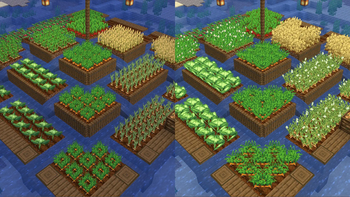
Vanilla crops are flat crosses of pixels, and a big wheat field looks like a carpet of identical tiles. Bee's Fancy Crops gives them a fuller, fluffier model and mixes in texture variations, so rows of wheat, carrots or potatoes look a little uneven and natural, like a real field. The pack also retextures seeds and the hay bale so the whole farming loop matches.
What changes
- A new, bushier crop model instead of the flat cross shape.
- Texture variations so neighboring plants do not look cloned.
- New textures for seeds and hay bales.
- Designed to suit modded crops, with Farmer's Delight as the main reference.
- Stays close to the vanilla palette, so it blends with most texture packs.
Compatibility
No mods are needed; just enable it under Resource Packs. It is client-side, so it works on any server. If you see a "made for a newer version" notice while playing a version the file is tagged for, it is safe to ignore. Place it above your main texture pack if that pack also changes crops.
Who it is for
Farm builders, cottagecore and village players, and anyone who stares at fields a lot in survival. The same author makes Geophilic, a subtle biome overhaul that fits the same gentle vanilla-plus feel. For more natural-looking surroundings, add Better Leaves or Simple Grass Flowers.
FAQ
Does Fancy Crops need OptiFine or any mod?
No. It is a plain resource pack and works in vanilla Minecraft without any extra mods.
Does it work with Farmer's Delight and other crop mods?
It was made with Farmer's Delight in mind, and the new crop model is designed to fit crops added by other mods too.
The game says the pack was made for a newer version. Is that a problem?
Not if your Minecraft version is listed for that download. You can safely ignore the warning in that case.
Gallery



Downloads by version
🛡 Files are downloaded directly from Modrinth’s servers – we never modify or rehost them. Modrinth ↗
How to install this mod
- Click “Download” to get the .zip – do not unzip it.
- Copy it into
.minecraft/resourcepacks. - In game: Options → Resource Packs → click the arrow to enable it.
- Using several packs? Put the most important one on top.
💬 Comments
✨ You might also like

Vanilla Experience+
by Kryqu
It improves, refines, and fixes various aspects while keeping the Vanilla style.

Better 3D Beds
by heycronus
Better 3D Beds is a texture pack for Minecraft that significantly enhances the appearance of beds in the game, making them more realistic and detailed with new 3D models. This texture replaces the old bed models with more beautiful and immersive versions.

Os' Colorful Grasses
by Oslypsis
Fluffier grasses! Tall, short, or original X style versions available, as well as a mix of the three for the optimal balance of visuals & performance. Get the full version on Patreon!

3D crops Revamped
by vexcenot
Makes minecraft crops 3D

Create Style Sophisticated Backpacks
by LopyLuna
Sophisticated Backpacks but Creatified!

Alacrity
by Satellence
32x resource pack with crazy attention to details