

Structory
Datapack · by Starmute · 9.5M downloads · Minecraft 26.3
What kind of structures does Structory add?
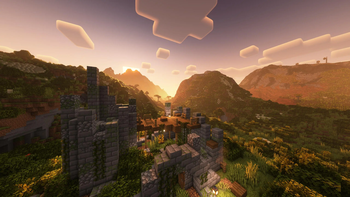
Structory, from the Stardust Labs team behind Terralith, is a structure pack with a quiet, storytelling flavour. Instead of huge dungeons packed with loot, it scatters small, atmospheric places across the world – ruins, lonely towers, cottages, graveyards, settlements, boats and more – that hint at what happened there. The lore is light: you piece it together from the buildings and the villagers connected to them.
Seasons of content
Besides normal maintenance updates, the project keeps growing through themed seasons. Each season tells a short, ambient story through villagers and their buildings, and it builds on structures already in the world rather than starting from scratch.
- Season 1 – Ruins: the Mangrove Ruins hide deep in swamps, while the Taiga Ruins wait in colder regions. Both leave you guessing what the old stones are trying to say.
- Season 2 – Harvest: rumours point to wicked witches cooking up something strange in the Old Manor, and stray too far and you may end up stuck in a rare Graveyard.
This seasonal approach means the world keeps getting new reasons to explore as the pack updates.
Add-ons
Apart from the seasons, some parts are released as add-ons that work alongside Structory or as standalone datapacks. Players and modpack makers can add or drop pieces to fit their taste. The first one is Structory: Towers, which adds a set of biome-themed towers.
Requirements and compatibility
| Format | Datapack – add it to the world's datapacks folder or your server |
| Minecraft | 1.19 – 26.3 |
| Side | Server required, client optional |
| Dependencies | None |
| License | Stardust Labs License |
- According to the authors, it plays nicely alongside most other worldgen and structure packs, for example Terralith and Structory: Towers.
- You can drop it into an existing world, but structures only spawn in chunks generated after that.
Wiki, bugs and translations
Stardust Labs keeps a Structory page on its Miraheze wiki, takes bug reports through the GitHub issue tracker, and accepts community translations on Weblate. Their Discord is the place for questions.
Who it suits
Survival players and builders who like discovering little scenes on their travels, and modpack makers who want more points of interest without changing the game's balance. Preview what a seed contains with the Minecraft Datapack Map before you start.
FAQ
Can I add Structory to an existing world?
Yes. Its structures will appear only in newly generated chunks, so explore new areas to find them.
Is Structory compatible with Terralith?
Yes. The authors say Structory works with most worldgen and structure datapacks, naming Terralith and Structory Towers as examples.
Do players need Structory to join a server that uses it?
No. It is required on the server and optional on the client, so players can connect without installing anything.
How do I find Structory structures in my seed?
Load your seed in jacobsjo's online Minecraft Datapack Map, which can show where datapack structures generate.
Gallery


Downloads by version
| Minecraft | Mod version | File | |
|---|---|---|---|
| 26.3 | 1.3.18+26.3 | 1.2 MB | Download |
| 26.2 | 1.3.17 | 1.2 MB | Download |
| 26.1.2 | 1.3.17 | 1.2 MB | Download |
| 26.1.1 | 1.3.17 | 1.2 MB | Download |
| 26.1 | 1.3.17 | 1.2 MB | Download |
| 1.21.11 | 1.3.17 | 1.2 MB | Download |
| 1.21.10 | 1.3.17 | 1.2 MB | Download |
| 1.21.9 | 1.3.17 | 1.2 MB | Download |
| 1.21.8 | 1.3.17 | 1.2 MB | Download |
| 1.21.7 | 1.3.17 | 1.2 MB | Download |
| 1.21.6 | 1.3.17 | 1.2 MB | Download |
| 1.21.5 | 1.3.17 | 1.2 MB | Download |
| 1.21.4 | 1.3.17 | 1.2 MB | Download |
| 1.21.3 | 1.3.17 | 1.2 MB | Download |
| 1.21.2 | 1.3.17 | 1.2 MB | Download |
| 1.21.1 | 1.3.17 | 1.2 MB | Download |
| 1.21 | 1.3.17 | 1.2 MB | Download |
| 1.20.6 | 1.3.5 | 1.2 MB | Download |
| 1.20.5 | 1.3.5 | 1.2 MB | Download |
| 1.20.4 | 1.3.5 | 1.2 MB | Download |
| 1.20.3 | 1.3.5 | 1.2 MB | Download |
| 1.20.2 | 1.3.5 | 1.2 MB | Download |
| 1.20.1 | 1.3.5 | 1.2 MB | Download |
| 1.20 | 1.3.5 | 1.2 MB | Download |
| 1.19.4 | 1.3.1a | 1.2 MB | Download |
| 1.19.3 | 1.3.1a | 1.2 MB | Download |
| 1.19.2 | 1.3.1a | 1.2 MB | Download |
| 1.19.1 | 1.3.1a | 1.2 MB | Download |
| 1.19 | 1.3.1a | 1.2 MB | Download |
How to install this mod
- Click “Download” to get the .zip.
- Copy it into
.minecraft/saves/./datapacks - Or when creating a new world: Data Packs → drag and drop the file.
- In a running world type
/reload.
💬 Comments
✨ You might also like

Cobblemon additions
by strikebyte
A Mod that adds villages with Pokemon Village/City variants - Originally made for the Brocraft server. This will spawn in a variety of structures within the villages as well. We are planning on adding rare structures!

Structory: Towers
by Starmute
Adds immersive biome-themed towers to the world, as a standalone option or add-on to Structory

Luki's Grand Capitals
by lukidonu
Rebuilt vanilla villages and illager structures to breathe new life into your world!

Blossom Blade
by joshieman
The sword stuck in the pedestal glows with a holy light, carrying the smell of cherry blossoms with every swing.

Hopo Better Underwater Ruins
by Hoponopono
Explore new ocean ruins to your world

Hopo Better Mineshaft
by Hoponopono
More and better mineshafts to explore