

Dynamic Lights
Datapack · by Tschipcraft · 8M downloads · Minecraft 26.2
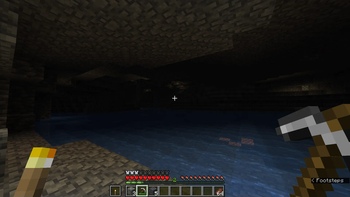
Hold a torch, light the cave – no client mod required
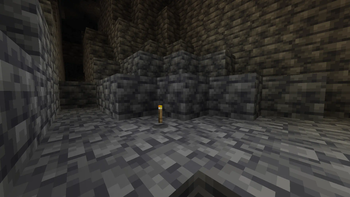
In vanilla Minecraft a torch in your hand does nothing until you place it. Dynamic Lights by Tschipcraft makes supported items glow while they are held or worn, by quietly placing and removing invisible light blocks around the holder. Because it only uses vanilla features, it works on servers where players have no mods installed at all.
What lights up
- 50+ vanilla items out of the box, such as torches, lanterns and glowstone.
- Several brightness steps (3, 6, 9, 12 and 15), so a torch and a lava bucket don't shine the same.
- Enchanted gear glows softly, with stronger light for enchantments like Fire Aspect, Riptide and Channeling.
- Amethyst-trimmed armor emits light.
- Mobs, falling blocks, display entities and item frames carrying a supported item glow too.
- Some items react to water, with matching sounds.
Install options
| Form | How |
|---|---|
| Data pack | Put the zip into your world's datapacks folder |
| Mod | Drop it into mods; add MidnightLib for a config screen. Requires Fabric API on Fabric, or QSL on Quilt |
Settings, reset and uninstall live in an in-game menu opened with /trigger tschipcraft.menu. The mod version on a client only affects single-player; joining a server without the pack has no effect. Forge is natively supported only up to 1.21.5.
Limitations to know
Being data-pack based has trade-offs, and the author lists them openly:
- Light jumps block by block instead of moving smoothly.
- If marker entities are removed by a cleanup plugin, stray light blocks can be left behind.
- Light blocks ignore pistons and explosions, which can confuse some redstone builds.
- On 1.21.4 and older, light updates can make sand or gravel fall.
- Shaders that ignore the vanilla lightmap, like Rethinking Voxels, won't show the light.
Who should use it
Server owners who want a vanilla-compatible quality-of-life touch for every player, and survival players who like exploring caves without spamming torches. If you play solo with a modded client, LambDynamicLights gives smoother results.
FAQ
Do players need to install anything to see the dynamic lights?
No. The light is created with vanilla light blocks on the server, so anyone joining a server with the pack sees it on an unmodded client.
Is it better than LambDynamicLights?
They solve the problem differently. This pack works without client mods but is limited to the block grid, so light moves in steps. For heavily modded setups or when you play on other people's servers, the author recommends a client-side mod such as LambDynamicLights.
How do I uninstall Dynamic Lights cleanly?
Open the pack menu with /trigger tschipcraft.menu (or the function shown on the project page) and use its uninstall option before removing the files, so leftover light blocks are cleaned up.
Gallery
Downloads by version
| Minecraft | Mod version | File | |
|---|---|---|---|
| 26.2 | 1.9.3 | 0.4 MB | Download |
| 26.1.2 | 1.9.3 | 0.4 MB | Download |
| 26.1.1 | 1.9.3 | 0.4 MB | Download |
| 26.1 | 1.9.3 | 0.4 MB | Download |
| 1.21.11 | 1.9.3 | 0.4 MB | Download |
| 1.21.10 | 1.9.3 | 0.4 MB | Download |
| 1.21.9 | 1.9.3 | 0.4 MB | Download |
| 1.21.8 | 1.9.3 | 0.4 MB | Download |
| 1.21.7 | 1.9.3 | 0.4 MB | Download |
| 1.21.6 | 1.9.3 | 0.4 MB | Download |
| 1.21.5 | 1.9.3 | 0.4 MB | Download |
| 1.21.4 | 1.9.3 | 0.4 MB | Download |
| 1.21.3 | 1.9.3 | 0.4 MB | Download |
| 1.21.2 | 1.9.3 | 0.4 MB | Download |
| 1.21.1 | 1.9.3 | 0.4 MB | Download |
| 1.21 | 1.9.3 | 0.4 MB | Download |
| 1.20.6 | 1.9.3 | 0.4 MB | Download |
| 1.20.5 | 1.9.3 | 0.4 MB | Download |
| 1.20.4 | 1.9.3 | 0.4 MB | Download |
| 1.20.3 | 1.9.3 | 0.4 MB | Download |
| 1.20.2 | 1.9.3 | 0.4 MB | Download |
| 1.20.1 | 1.9.3 | 0.4 MB | Download |
| 1.20 | 1.9.3 | 0.4 MB | Download |
| 1.19.4 | 1.9.3 | 0.4 MB | Download |
| 1.19.3 | 1.9.3 | 0.4 MB | Download |
| 1.19.2 | 1.9.3 | 0.4 MB | Download |
| 1.19.1 | 1.9.3 | 0.4 MB | Download |
| 1.19 | 1.9.3 | 0.4 MB | Download |
| 1.18.2 | 1.9.3 | 0.4 MB | Download |
| 1.18.1 | 1.9.3 | 0.4 MB | Download |
| 1.18 | 1.9.3 | 0.4 MB | Download |
| 1.17.1 | 1.9.3 | 0.4 MB | Download |
| 1.17 | 1.9.3 | 0.4 MB | Download |
🛡 Files are downloaded directly from Modrinth’s servers – we never modify or rehost them. Modrinth ↗
How to install this mod
- Click “Download” to get the .zip.
- Copy it into
.minecraft/saves/./datapacks - Or when creating a new world: Data Packs → drag and drop the file.
- In a running world type
/reload.
💬 Comments
🔗 Works well with

Fabric API
by modmuss50
Lightweight and modular API providing common hooks and intercompatibility measures utilized by mods using the Fabric toolchain.

Mod Menu
by Prospector
Adds a mod menu to view the list of mods you have installed.

MidnightLib
by Motschen
Common library providing a lightweight configuration system
✨ You might also like

VeinMiner
by Miraculixx
Mine the whole vein on mining a single ore/block. Make the tedious mining experience to something satisfying and fun! FTB Ultimine alternative

Dungeons and Taverns
by NovaWostra
A Structure Datapack adding dungeons, taverns and other structures to find while you explore the world.

VeinMiner Enchantment
by Miraculixx
Veinminer Addon - Adds vineminer enchantment to enchanting tables. Only tools with the enchantment can veinmine

PokéCenter PCs (Cobblemon Addon)
by Instrafe
Adds a PC to every village PokeCenter

Cobblemon Journey Mounts
by FactionVoid
More Cobblemon Mounts for Cobblemon 1.7

Armor Stand Arms
by Jodek
Armor stands get arms automatically when placed