

rotrBLOCKS
Resource pack · by illystray · 2M downloads · Minecraft 26.3
About
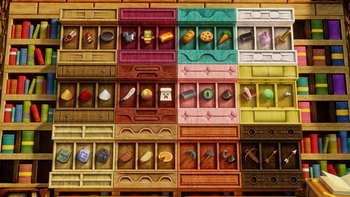
rotrBLOCKS is a Minecraft Java resource pack for 128x, realistic, and vanilla-like, supporting versions 1.13 to 26.3. It is developed by illystray and has 2M downloads on Modrinth.
Gallery


Downloads by version
| Minecraft | Mod version | File | |
|---|---|---|---|
| 26.3 | V88-3D-Foliage | 186 MB | Download |
| 26.2 | V88-3D-Foliage | 186 MB | Download |
| 26.1.2 | V88-3D-Foliage | 186 MB | Download |
| 26.1.1 | V88-3D-Foliage | 186 MB | Download |
| 26.1 | V88-3D-Foliage | 186 MB | Download |
| 1.21.11 | V88-3D-Foliage | 186 MB | Download |
| 1.21.10 | V88-3D-Foliage | 186 MB | Download |
| 1.21.9 | V88-3D-Foliage | 186 MB | Download |
| 1.21.8 | V88-3D-Foliage | 186 MB | Download |
| 1.21.7 | V88-3D-Foliage | 186 MB | Download |
| 1.21.6 | V88-3D-Foliage | 186 MB | Download |
| 1.21.5 | V88-3D-Foliage | 186 MB | Download |
| 1.21.4 | V88-3D-Foliage | 186 MB | Download |
| 1.21.3 | V88-3D-Foliage | 186 MB | Download |
| 1.21.2 | V88-3D-Foliage | 186 MB | Download |
| 1.21.1 | V88-3D-Foliage | 186 MB | Download |
| 1.21 | V88-3D-Foliage | 186 MB | Download |
| 1.20.6 | V88-3D-Foliage | 186 MB | Download |
| 1.20.5 | V88-3D-Foliage | 186 MB | Download |
| 1.20.4 | V88-3D-Foliage | 186 MB | Download |
| 1.20.3 | V88-3D-Foliage | 186 MB | Download |
| 1.20.2 | V88-3D-Foliage | 186 MB | Download |
| 1.20.1 | V88-3D-Foliage | 186 MB | Download |
| 1.20 | V88-3D-Foliage | 186 MB | Download |
| 1.19.4 | V88-3D-Foliage | 186 MB | Download |
| 1.19.3 | V88-3D-Foliage | 186 MB | Download |
| 1.19.2 | V88-3D-Foliage | 186 MB | Download |
| 1.19.1 | V88-3D-Foliage | 186 MB | Download |
| 1.19 | V88-3D-Foliage | 186 MB | Download |
| 1.18.2 | V88-3D-Foliage | 186 MB | Download |
| 1.18.1 | V88-3D-Foliage | 186 MB | Download |
| 1.18 | V88-3D-Foliage | 186 MB | Download |
| 1.17.1 | V88-3D-Foliage | 186 MB | Download |
| 1.17 | V88-3D-Foliage | 186 MB | Download |
| 1.16.5 | V88-3D-Foliage | 186 MB | Download |
| 1.16.4 | V88-3D-Foliage | 186 MB | Download |
| 1.16.3 | V88-3D-Foliage | 186 MB | Download |
| 1.16.2 | V88-3D-Foliage | 186 MB | Download |
| 1.16.1 | V88-3D-Foliage | 186 MB | Download |
| 1.16 | V88-3D-Foliage | 186 MB | Download |
🛡 Files are downloaded directly from Modrinth’s servers – we never modify or rehost them. Modrinth ↗
How to install this mod
- Click “Download” to get the .zip – do not unzip it.
- Copy it into
.minecraft/resourcepacks. - In game: Options → Resource Packs → click the arrow to enable it.
- Using several packs? Put the most important one on top.
💬 Comments
✨ You might also like

Default HD 128x
by thebaum64
The classic Minecraft experience but in amazing 128x HD!

Patrix 32x
by patrixcraft
Realistic textures with vanilla colors custom-made for shaders

Alacrity
by Satellence
32x resource pack with crazy attention to details

Bare Bones
by RobotPants
Minecraft with the style of the trailers
Faithful 32x
by Faithful-Resource-Pack
The original Minecraft texture feel, with double the resolution and double the fun!

Ashen 16x
by Aim_Boot
A 16x, medieval-fantasy take on Minecraft.